Baby Designer: A Sweet & Friendly Handwritten Font
Typography can make or break a design. It’s not just about legibility—it’s about personality, tone, and emotional connection. Enter Baby Designer, a charming, handwritten display font that brings a sense of warmth and playfulness to any visual project. Whether you're designing wedding invitations, greeting cards, or digital content, this font adds a touch of joy that’s hard to replicate with more formal typefaces.
What Makes Baby Designer Unique
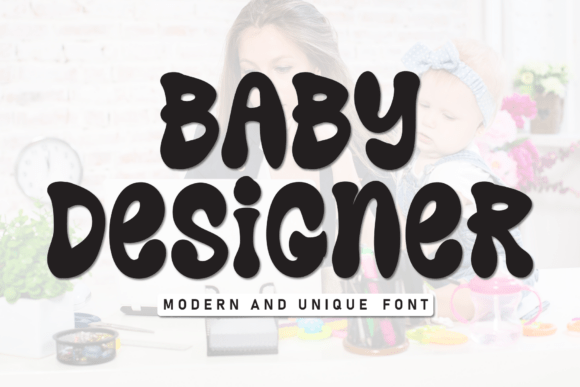
Baby Designer stands out with its soft curves, uneven baselines, and gentle imperfections that mimic real handwriting. Unlike rigid, computer-generated fonts, Baby Designer feels organic and approachable. Its design balances between casual and elegant, making it versatile for both personal and semi-professional use.
What makes it particularly useful is its emotional resonance. The font feels personal, like a handwritten note from a friend. That kind of warmth is invaluable when you're trying to connect with your audience on a human level.
Creative Applications for Baby Designer
This font shines in contexts where sincerity and charm matter. Here are a few creative uses that highlight its flexibility:
- Wedding Invitations: Use Baby Designer for the names or event details to give your invitation a romantic, hand-crafted feel.
- Children’s Books and Educational Materials: The playful nature of the font makes it perfect for illustrations, titles, and captions aimed at younger audiences.
- Branding for Lifestyle and Boutique Businesses: Especially in niches like baby products, home décor, or artisanal goods, Baby Designer adds a personal touch to logos and packaging.
- Social Media Graphics: Stand out in crowded feeds with custom captions and quotes that feel handwritten and authentic.
Pairing Baby Designer with Other Fonts
For best results, pair Baby Designer with clean, minimalist fonts that let it shine without overwhelming the design. Sans-serif typefaces like Montserrat or Open Sans provide a modern contrast that keeps the overall look balanced and professional.
Try using Baby Designer for headlines or accents, and a more structured font for body text. This combination ensures readability while preserving the font’s expressive qualities.
How Different Users Can Benefit from Baby Designer
Whether you're a seasoned designer or a creative hobbyist, Baby Designer offers something for everyone. Here's how different audiences can put it to use:
- Freelancers and Designers: Add a new tool to your design toolkit that works well across multiple client projects, from branding to print materials.
- Bloggers and Content Creators: Elevate your blog graphics, quote images, and Pinterest pins with a font that feels personal and engaging.
- Entrepreneurs and Small Business Owners: Use Baby Designer to craft social media posts, product packaging, or email newsletters that stand out and feel authentic.
- Educators and Parents: Create fun, visually appealing learning materials or personalized notes for students and children.
Design Tips for Using Baby Designer Effectively
To get the most out of Baby Designer, consider these practical tips:
- Use it for short text: Because of its decorative nature, Baby Designer works best in titles, headers, and short phrases rather than long paragraphs.
- Adjust spacing carefully: Kerning and line spacing can significantly impact how the font reads. Take time to fine-tune these settings for clarity and visual balance.
- Limit color choices: Stick to soft, muted tones or classic black to preserve the font’s hand-drawn charm. Bright, neon colors can clash with its gentle aesthetic.
- Combine with hand-drawn elements: To enhance the organic feel, pair Baby Designer with doodles, brush strokes, or watercolor textures.
Real-World Examples to Spark Inspiration
Seeing Baby Designer in action can help you envision how it fits into your own projects. Consider these real-life applications:
- A local bakery using Baby Designer on their Instagram posts to highlight daily specials or new menu items.
- A children’s book illustrator integrating the font into speech bubbles and character names to create a whimsical tone.
- A wedding planner incorporating the font into save-the-date cards and venue signage to add a romantic, hand-crafted touch.
- A lifestyle blogger using Baby Designer in quote graphics shared across Pinterest and Instagram to increase engagement.
Making Baby Designer Your Own
While Baby Designer comes with a distinct personality, it’s also highly adaptable. You can tweak its size, color, and layout to suit different design goals. Experiment with layering, texture overlays, or even hand-traced effects to give your text a more personalized feel.
Consider using it in conjunction with other design elements like soft shadows, subtle gradients, or paper textures to enhance its organic appeal. The key is to maintain a cohesive visual language while letting the font’s character shine through.
Final Thoughts
Baby Designer isn’t just another font—it’s a creative tool that brings warmth, personality, and authenticity to your designs. Whether you're crafting a heartfelt card or building a brand identity, this font helps you connect with your audience in a meaningful way. By understanding its strengths and applying it thoughtfully, you can elevate your visual storytelling and make your projects feel more human and heartfelt.